10 min read
Vector databases, minus the hand-waving
What they actually store, why finding similar things is hard at scale, and the fairly common case where a WHERE clause is still the right answer.
- #ai
- #vector-search
- #databases
- #rag
Your database is excellent at questions like which users signed up after March? It is completely useless at which support ticket is basically the same complaint as this one?
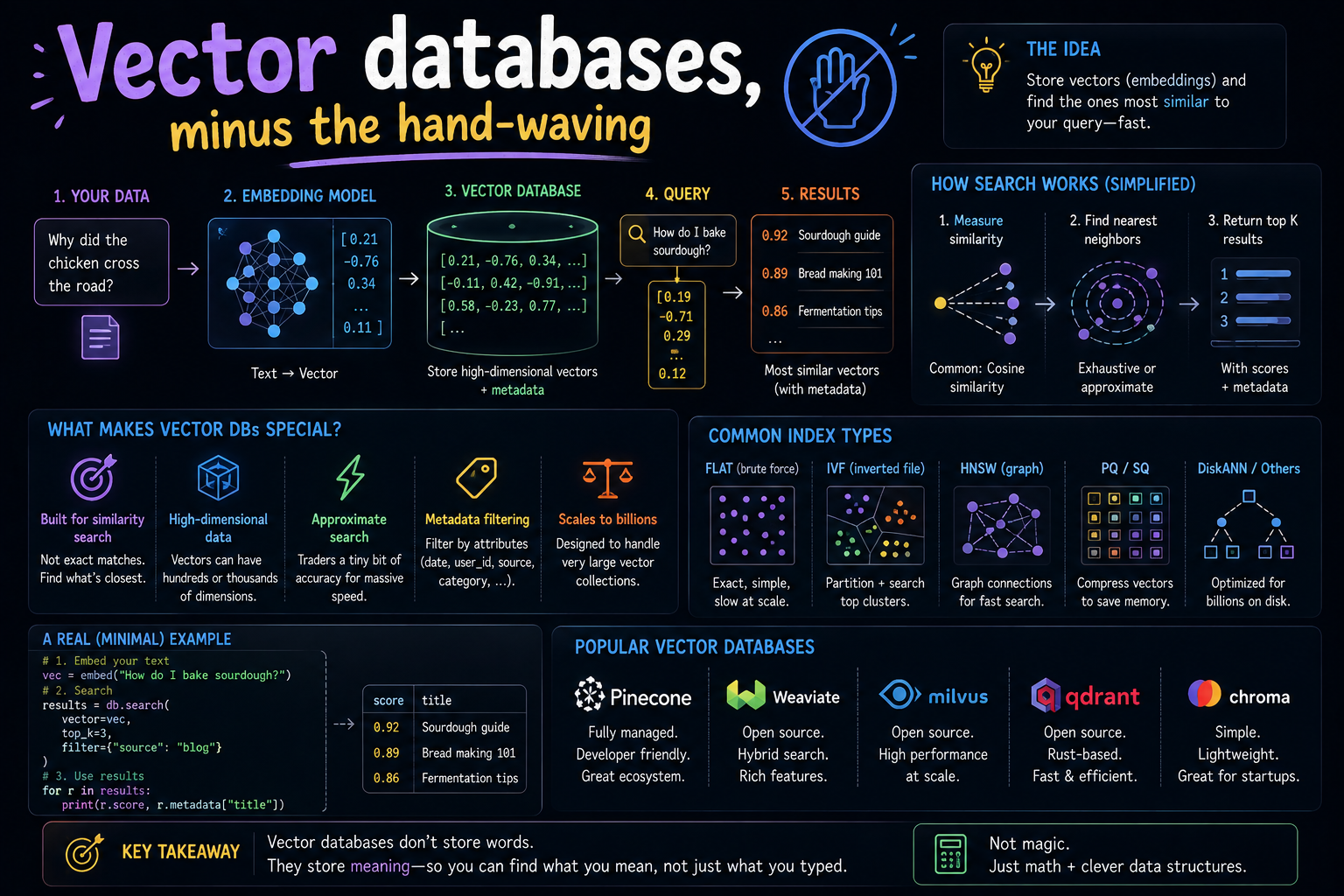
That gap is the entire reason vector databases exist. Everything else — the index types, the distance metrics, the acronyms that sound like Scandinavian furniture — is implementation detail stacked on top of that one missing capability.
Here is what they actually do, how they do it fast, and the fairly common case where you should not use one at all.
Exact matching goes wrong quietly
A WHERE clause is a machine for exact answers. Even the fuzzy-looking ones are exact underneath:
-- Finds nothing, despite the answer sitting right there
SELECT * FROM articles
WHERE body LIKE '%stop being charged%';

-- The article you wanted is titled:
--   "Cancelling your subscription"
Zero shared words beyond the odd preposition. Full-text search improves matters a little — it stems words, drops stopwords, ranks by term frequency — but it is still fundamentally matching strings. It does not know that cancelling a subscription is how one stops being charged.
What we want is search over meaning. Which means we need meaning to be something a computer can measure.
Meaning becomes coordinates
An embedding model takes text and returns a list of numbers — a vector — positioned so that similar meanings land near each other. Cancelling your subscription and how do I stop being charged end up as neighbours despite sharing no vocabulary.
If that sentence is doing a lot of unexplained work for you, the companion article to this one covers embeddings properly. For now, take it as given: text in, coordinates out, and nearby means similar.
Once that is true, semantic search collapses into a geometry problem, and geometry problems are the kind computers are extremely good at.
The one operation that matters
A vector database exists to answer a single question, very quickly:
Given this vector, which stored vectors are closest to it?
Nearest neighbour search — the whole job, in one line
You can write the naive version in about four lines. Compare the query against every stored vector, sort, take the top ten. For ten thousand documents on a laptop, this is genuinely fine and you should not over-engineer it.
Then the numbers grow. Ten million vectors at 1,536 dimensions is roughly 15 billion multiply-add operations for a single query. One user, one search. Now add concurrency and a 50 ms latency budget, and brute force stops being charming.
The trade everyone made: approximate answers
The industry's answer is Approximate Nearest Neighbour search, or ANN. You give up the guarantee of finding the perfect top ten, and in exchange you get results one or two orders of magnitude faster.
If giving up correctness makes you twitch, sit with this for a second: you are building a search results page. Nobody has ever noticed that the item which should have been 6th appeared 7th. The accuracy you are trading away is almost entirely accuracy your users cannot perceive.
How much you give up is a dial, not a fixed cost — it is called recall, and every index exposes knobs for it. Typical production settings land around 95–99% recall for a very large speed win.
The two indexes you will actually meet
HNSW — the airport hub model
Hierarchical Navigable Small World is the default in most modern vector databases, and the mental model is air travel.
To reach a small town, you do not drive the whole way. You take a long-haul flight to a major hub, then a regional flight to a smaller airport, then something short and undignified to the town itself. Each layer covers less distance but more precisely.
HNSW builds exactly that: a top layer with few nodes and very long links for covering ground fast, descending to a bottom layer containing everything, with only short local links. A search drops down the layers, getting closer at each one.
- Very fast, very good recall — the reason it is everywhere
- Memory hungry — the graph lives in RAM and it is not small
- Deletes are awkward — usually tombstoned and cleaned up later, not truly removed
IVF — the library sections model
An Inverted File index groups vectors into clusters up front, the way a library groups books into sections. To find a book on Roman history you do not scan the building; you work out which two or three sections are relevant and search only those.
IVF runs k-means over your vectors to build the sections, then at query time checks only the nearest few clusters. The nprobe setting controls how many — turn it up for better recall, down for speed.
- Much lighter on memory, especially combined with compression
- Needs training on a representative sample before it is useful
- Struggles when data drifts — clusters built last year may not fit this year's data
| Index | Speed | Recall | Memory | Best for |
|---|---|---|---|---|
| Flat (exact) | Slow at scale | Perfect | Low | Under ~100k vectors |
| HNSW | Very fast | Excellent | High | Most production workloads |
| IVF + PQ | Fast | Good | Low | Very large or memory-bound sets |
Start with flat. Move to HNSW when flat stops keeping up. Reach for IVF with compression when HNSW's memory bill becomes the problem. That is the whole decision tree for the overwhelming majority of projects.
Distance metrics, and the silent way to get them wrong
Three metrics cover nearly everything you will encounter:
- Cosine similarity — the angle between vectors, ignoring length. The usual pick for text.
- Euclidean (L2) — straight-line distance. Common for image embeddings.
- Dot product — cheapest to compute, and identical in ranking to cosine when vectors are normalised.
The rule is short: use whatever your embedding model was trained with. Its model card says. Most text models say cosine.
There is no error message for the wrong metric
Pick the wrong distance function and nothing fails. The query returns ten results, the page renders, the tests pass. The results are just measurably worse forever, and nothing anywhere will tell you why.
What a database gives you that an array does not
You can hold vectors in memory and search them with twenty lines of Python. For a prototype, do exactly that. A database earns its keep when you need the boring things around the search:
- Persistence — surviving a restart without recomputing everything
- Incremental writes and deletes — harder than it sounds once an index is involved
- Metadata filtering — the big one; see below
- Concurrency, replication, backups — the unglamorous production tax
The metadata filtering trap
Almost every real query is not purely semantic. It looks like this:
Find documents similar to this one — but only for tenant 42, only published, and only in English.
Every real application, immediately
There are three ways a system can handle that, and the difference between them is the difference between a product and a demo.
- Post-filtering. Fetch the top 100 by similarity, then discard everything failing the filter. Ask for 10 results, get 3, because the other 97 belonged to different tenants. Sometimes you get zero.
- Pre-filtering. Narrow to matching rows first, then search within them. Correct, but often cannot use the ANN index properly, so it degrades toward brute force.
- Filtered search. Apply the filter during index traversal, skipping non-matching nodes as it walks. Correct and fast — and meaningfully harder to build, which is why not everyone has it.
If you evaluate vector databases, test this specifically, with a realistic high-cardinality filter like a tenant ID across thousands of tenants. A low-cardinality filter such as language = 'en' makes every product look competent. Tenant isolation is where they separate.
Quantisation, or why your RAM bill is optional
A float32 number takes four bytes. A million 1,536-dimension vectors is therefore about six gigabytes before you have stored a single actual document — and the HNSW graph sits on top of that.
Compression is how that bill comes down, and there are two levels worth knowing:
- Scalar quantisation. Store each number as one byte instead of four. Four times smaller, very little quality lost. This is nearly free and often on by default.
- Product quantisation. Chop the vector into slices and replace each with a code from a learned codebook. Compression of 10–30x, with real but usually acceptable recall loss.
The standard production pattern is to search the compressed vectors to build a shortlist quickly, then rescore that shortlist against the full-precision originals. You get most of the memory savings and almost none of the accuracy penalty.
You may not need a vector database at all
This is the part vendors would rather skip.
If you already run Postgres and you have fewer than roughly a million vectors, pgvector is very likely the correct answer. It is an extension, it does HNSW, and it buys you something no dedicated vector database can:
SELECT a.id, a.title, a.body
FROM articles a
JOIN subscriptions s ON s.user_id = a.author_id
WHERE a.tenant_id = 42
  AND a.status = 'published'
  AND s.plan = 'pro'
ORDER BY a.embedding <=> $1     -- cosine distance
LIMIT 10;
Semantic ranking and a real relational join, in one query, inside one transaction, covered by one backup. The moment your vectors live in a separate system, that query becomes two round trips and a pile of application code reconciling them — plus a second thing to operate, monitor and keep in sync.
Dedicated vector databases genuinely earn their place at tens of millions of vectors, or when you need features Postgres does not have. Below that line, adding one is usually adding a distributed systems problem to buy a feature you already had.
Two things that surprise people in production
Updates are not free. Changing a document means re-embedding it and rewriting its vector into the index. On HNSW that means graph surgery, and a workload of constant small updates behaves very differently from one big nightly rebuild. If your content changes hourly, benchmark that pattern specifically — most published benchmarks quietly assume a static corpus.
Recall degrades as you delete. Deletions are typically tombstones: the node stays in the graph, marked dead, still consuming memory and still being walked past during searches. Delete a large fraction of a collection and both quality and speed drift downward until the index is rebuilt. Know how your chosen system compacts, and whether it does so automatically.
Four things that will improve results more than your database choice
- Fix your chunking. Chunks are almost always too big. One coherent idea per chunk beats any index tuning you will ever do.
- Add keyword search back. Hybrid search — combining BM25 with vector similarity — reliably beats either alone. Semantic search is bad at exact tokens: error codes, SKUs, surnames.
ERR_CONN_4021has no meaning to embed. - Rerank the shortlist. Retrieve 50 candidates cheaply, then rerank to the final 5 with a cross-encoder that reads query and document together. Often the single largest quality jump available.
- Look at your results. Take twenty real queries, read what comes back, and be honest about it. Teams routinely tune indexes for a week without once reading their own output.
The short version
A vector database is a specialised tool for one job: given a list of numbers, find similar lists of numbers, quickly, at scale, with filters attached. It does that job well.
But whether those numbers mean anything at all was decided earlier, by the embedding model — and no index, metric or vendor can rescue you from that. Which is why the companion article to this one is about embeddings, and why it is arguably the more important half of the pair.