10 min read
Embeddings, or how text becomes math
How a sentence turns into a list of numbers, why those numbers mean anything at all, and the quiet mistakes that wreck your search results.
- #ai
- #embeddings
- #search
- #rag
Type my card got declined into a plain search box, over a help centre whose article is titled Payment failure troubleshooting, and you will get nothing. Not because the answer is missing. Because the computer is comparing letters, and letters have no idea what you meant.
Embeddings are the fix for that. They are the step where language stops being text and starts being geometry — and once you can measure meaning with a ruler, an enormous amount of hard search behaviour becomes easy arithmetic.
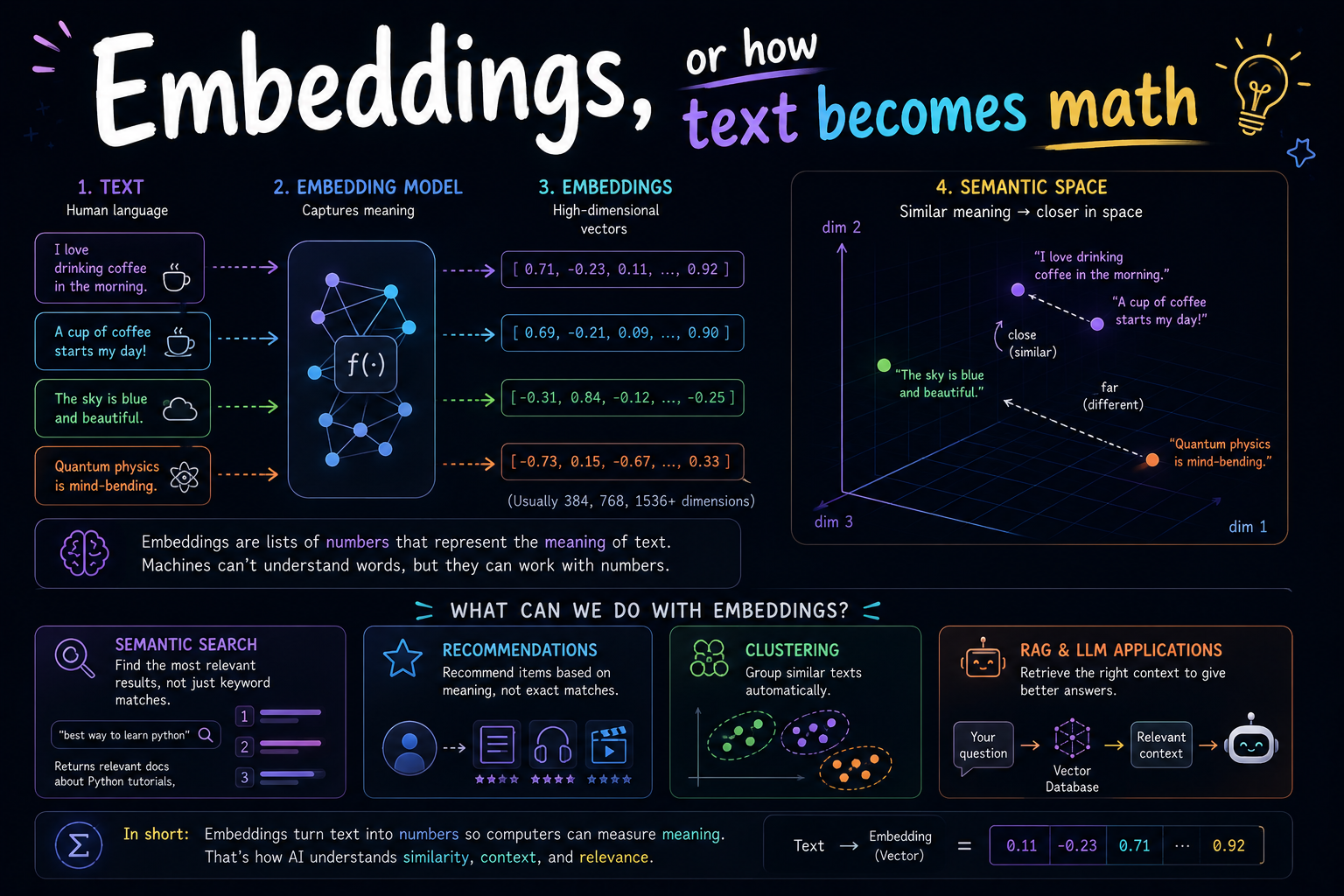
This is the beginner's tour: what an embedding actually is, where the numbers come from, and the handful of quiet mistakes that ruin results without ever throwing an error.
An embedding is just a list of numbers
That is the entire definition. You hand a model some text, and it hands back an array of floating point numbers — often 384 of them, or 768, or 1536.
from sentence_transformers import SentenceTransformer

model = SentenceTransformer("all-MiniLM-L6-v2")
vector = model.encode("my card got declined")

print(len(vector))   # 384
print(vector[:5])    # [0.021, -0.44, 0.13, 0.07, -0.09]
Stare at those numbers as hard as you like; they mean nothing on their own. No single one of them is the formality number or the anger number. The meaning is not in any individual value. It is in where the vector sits relative to every other vector.
Meaning, but as a map
Colours are the easiest way in. Red is #FF0000. A slightly different red is #FE0201. You can tell those are nearly the same colour by subtracting numbers — you never have to compare the words red and crimson. The numbers carry the similarity for you.
Embeddings do that for meaning. Text that means similar things lands in a similar place:
- dog and puppy — very close together
- dog and cat — close-ish, both pets, both animals
- dog and quarterly tax audit — a long way apart, mercifully
And crucially, my card got declined lands near payment failure troubleshooting despite sharing exactly zero words. That is the whole trick. Nothing else in this article matters as much as that sentence.
The famous party trick, and why it is oversold
You have probably seen this one:
king − man + woman ≈ queen
The demo that launched a thousand blog posts
It genuinely works. It is also wheeled out far more often than it earns, because it works beautifully on the curated handful of examples everyone reuses and falls over on plenty of others.
The useful lesson is not the arithmetic. It is that directions in the space carry meaning. There is roughly a royalty direction, roughly a plural direction, roughly a past tense direction. The model was never told to build those. They fell out of the training, which is either delightful or unsettling depending on your week.
It is not only for text
Nothing about the idea is language-specific. Anything you can train a model to place on a map, you can embed:
- Images. A photo of a golden retriever lands near a photo of a labrador.
- Audio. Two recordings of the same speaker land near each other.
- Products, users, songs. This is what most recommendation engines have quietly been doing for years.
Some models go further and embed different kinds of thing into one shared space — text and images together, so the phrase a dog on a skateboard lands near an actual photograph of exactly that. That is how image search by description works, and it is the same machinery throughout.
So where do the numbers come from?
Nobody sits down and assigns them. They are learned, and the core idea is almost aggressively simple: show the model pairs, and teach it to pull or push.
- Take two pieces of text that mean the same thing — a question and its correct answer, say. Nudge their vectors closer.
- Take two unrelated pieces of text. Shove their vectors further apart.
- Repeat several hundred million times.
That is contrastive learning, minus the notation. What falls out the far end is a coordinate space where distance genuinely tracks semantic similarity, because that is the only property the training ever rewarded.
What are all those dimensions?
A reasonable question on first contact: if a vector has 768 numbers, what are they for? The unsatisfying but honest answer is that meaning is smeared across all of them at once. This is called a distributed representation, and it means you cannot point at dimension 412 and say what it does.
What dimension count actually costs you is real, though:
| Model | Dimensions | 1M vectors (float32) | Rough vibe |
|---|---|---|---|
| all-MiniLM-L6-v2 | 384 | ~1.5 GB | Fast, tiny, runs on a laptop CPU |
| text-embedding-3-small | 1536 | ~6 GB | Strong general default |
| text-embedding-3-large | 3072 | ~12 GB | Better, pricier, often overkill |
Bigger is not automatically better for your use case — it is reliably better at costing you money and RAM. Some newer models are trained so you can truncate the vector (Matryoshka-style) and keep most of the quality at a fraction of the size, which is a very good deal when you have millions of rows.
Measuring similarity
Once everything is a vector, how similar are these two things becomes a one-line calculation. The usual choice for text is cosine similarity — the angle between two vectors, ignoring how long they are.
import numpy as np

def cosine_similarity(a, b):
    return np.dot(a, b) / (np.linalg.norm(a) * np.linalg.norm(b))

cosine_similarity(encode("my card got declined"),
                  encode("payment failure troubleshooting"))
# 0.71  -> closely related

cosine_similarity(encode("my card got declined"),
                  encode("how to bake sourdough"))
# 0.08  -> unrelated
Cosine runs from -1 to 1. But here is the part people trip on: those numbers are not comparable across models. One model treats 0.75 as a strong match; another squashes everything into a narrow band where 0.75 means barely related at all.
Never hardcode a threshold you read in a blog post
Including this one. A cutoff like 'reject anything below 0.8' has to be calibrated against your own data and your own model, or you will silently throw away good results and keep terrible ones.
An embedding is not a summary
A common early misreading is that a vector is some sort of compressed version of the text, which you could unpack later. It is not. It is a position, and the journey there is lossy — you cannot store vectors instead of your documents and expect to get the documents back.
Which leads to a point worth taking seriously if you handle anyone's private data:
Embeddings are not anonymisation
It is demonstrably possible to reconstruct a surprising amount of the original text from its embedding alone. If the source text was sensitive, treat the vector as sensitive too — same access controls, same retention rules, same care in backups.
Plenty of teams have shipped a vector store to a third-party service on the assumption that they are only numbers. They are only numbers in the same sense that a hash of a four-digit PIN is only a number.
What people actually build with this
Search is the headline act, but the same primitive drives a lot more:
- Retrieval-augmented generation. Find the relevant passages, paste them into an LLM prompt. Nearly every 'chat with your docs' product is this.
- Deduplication. Two support tickets phrased differently, describing one bug — near-identical vectors, easy to catch.
- Recommendations. Things near what you liked.
- Clustering and triage. Group thousands of pieces of feedback by what they are about, without defining the categories up front.
- Classification. Embed the text, embed a few labelled examples, take the nearest one. Startlingly effective for a few lines of code.
The mistakes that actually bite
None of the following throw an exception. That is exactly what makes them expensive — everything looks like it is working, and the results are just quietly bad.
1. Mixing models
If you embed your documents with one model and your queries with another, you get results back. They will be nonsense, because the two models built different coordinate spaces that happen to have the same number of axes. Same trap on upgrades: switching models means re-embedding your entire corpus, not just new rows.
2. Chunking badly
Embedding an entire 40-page PDF into a single vector produces a vector that means, roughly, documents. Average enough distinct ideas together and you land in the bland middle of the space, near nothing in particular.
Aim for one coherent idea per chunk — a paragraph or a small section. Small enough to be about one thing, big enough to still be about something.
3. Chunks that lost their context
A chunk reading It costs $49 per month. is useless in isolation. What costs $49? The chunk no longer knows, and neither does its vector. Prepend the document title and section heading to each chunk before embedding it — a cheap fix that punches far above its weight.
4. Negation
These two sentences land almost on top of each other:
- The API supports webhooks.
- The API does not support webhooks.
Embeddings are notoriously weak at negation, because both sentences are overwhelmingly about the same topic. If your application cares about the difference — and for anything factual it should — similarity alone must not be the final word.
5. Asymmetric search
A five-word question and a 300-word documentation passage are different shapes of text, even when one answers the other. Several models handle this explicitly and expect you to label which is which, usually with a prefix like query: and passage:. If your model's card asks for that, using it is free accuracy; skipping it is a silent downgrade.
6. Assuming multilingual works by accident
A model trained overwhelmingly on English will happily accept Persian, Turkish or Japanese input and return a vector. It will not throw. It will simply be much worse, and you will not find out until a user complains. If you serve more than one language, pick a model that was explicitly trained multilingual and test it in each language you actually support.
7. Forgetting that your corpus drifts
You embedded everything in March. Since then the product renamed three features, added a pricing tier and deprecated an integration. The vectors do not know any of that — they are a snapshot of what the text meant when you ran the job. Re-embed changed documents as part of your normal content pipeline, not as an annual spring clean.
Picking a model without overthinking it
Start small. Genuinely. A compact model like all-MiniLM-L6-v2 runs on a laptop CPU, costs nothing per call, and is entirely adequate for a great many products. Reach for the big paid models when you have a measurement telling you to, not as an opening move.
The public leaderboards are a starting point, not an answer — they are averages over benchmark datasets that are not your data. The single highest-value hour you can spend here:
- Write down 30 to 50 real queries your users actually type.
- For each, note which document should come back first.
- Run your candidate models against that list and count how often they get it right.
That afternoon's work will tell you more about which model fits your product than any leaderboard ever will, and it gives you a regression test for the next time someone wants to swap models.
Cost and latency, briefly
- Batch your calls. Embedding 500 chunks in one request is dramatically cheaper and faster than 500 requests.
- Cache aggressively. The same text always produces the same vector — hash the text, store the result, never pay twice.
- Re-embedding on every deploy is a bug, not a pipeline. Embedding a large corpus should be a deliberate, occasional event.
Where this leaves you
Embeddings are the step where meaning becomes measurable. Everything downstream — semantic search, retrieval-augmented generation, recommendations, clustering, deduplication — is built on the assumption that this step produced a space where distance means something.
Get it right and the database that stores these vectors becomes almost boring: it just finds nearby numbers, quickly. Get it wrong and no amount of database tuning will rescue you. You will be searching with tremendous efficiency through a space that does not mean anything.
Which is a good moment to talk about that database — vector databases are the subject of the companion article to this one.