15 min read
The N+1 Query Problem: How One Innocent Loop Becomes 101 Database Trips
It's snappy on your laptop with 10 rows and it takes your database hostage with 10,000. Here's the most common performance bug in backend code — how to spot it, the fixes nobody explains properly, and when to just leave it alone.
Picture the scene. You ship an endpoint. GET /posts, returns a list of blog posts with each author's name attached. Twelve lines of code. On your laptop it answers in 40 milliseconds and you briefly feel like one of the greats.
Three months later there are 4,000 posts in production, that same endpoint takes nine seconds, the database CPU graph looks like an EKG during a jump scare, and somebody has opened a ticket titled "is the site down?" Nobody has touched those twelve lines since the day you wrote them.
Nothing broke. Nothing regressed. You just wrote an N+1, and it has been patiently waiting for you to get some users.
Quick note before we start
N+1 is not a bug in your ORM, your database, or your framework — every one of them is doing exactly what you asked. It's a bug in the shape of the code, which is why it sails through code review and why it shows up in every language ever used to talk to a database. The examples below hop between Python, JavaScript, Ruby and SQL. You only need to read the ones you recognize; the idea is identical in all of them.
The entire bug, in one loop
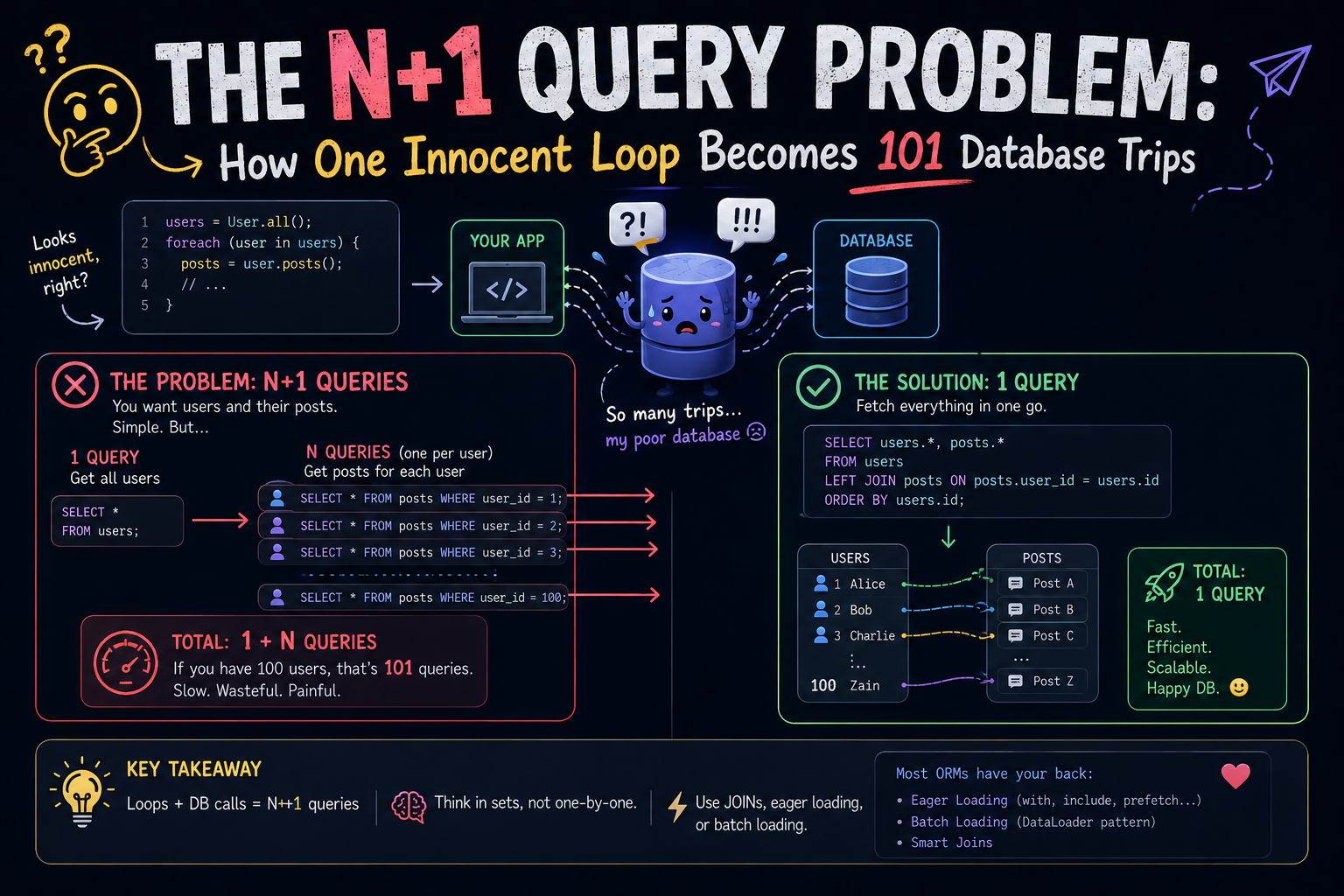
Here's the whole problem. Two lines of it are perfectly reasonable and one line of it is a trapdoor:
# 1 query — fetch the posts
posts = db.query("SELECT * FROM posts LIMIT 100")

for post in posts:
    # 1 query... but you're inside a loop, so make that 100
    author = db.query("SELECT * FROM users WHERE id = ?", post.author_id)
    print(post.title, "—", author.name)
Count the trips to the database. One to get the posts, then one more for every single post that came back. With 100 posts that's 1 + 100 = 101 queries to render one page. That's the entire joke behind the name: N+1, where 1 is the query you meant to write and N is "however many rows that first query happened to return."
Now here's the genuinely nasty part, the reason this bug outlives so many code reviews: every one of those 101 queries is fast. Each is a primary-key lookup on an indexed column — half a millisecond, the sort of query no slow-query log will ever flag. There is no villain in your logs. There's just a crowd.
Why it's invisible on your laptop
On your machine, your app and your database are the same machine. A round trip costs approximately nothing. In production, your app server and your managed Postgres are two different computers, possibly in two different availability zones, definitely with a network in between. Every query pays a toll, and N+1 doesn't make the toll bigger — it just makes you pay it N more times.
| Where the database lives | Round trip | 101 queries | 1 query |
|---|---|---|---|
| Your laptop (app and DB on one machine) | ~0.15 ms | ~15 ms | ~0.2 ms |
| Same data center / VPC | ~1 ms | ~100 ms | ~1 ms |
| Cross-AZ or a managed DB over the wire | ~5 ms | ~500 ms | ~5 ms |
| …and now 1,000 rows instead of 100, cross-AZ | ~5 ms | ~5 seconds | ~5 ms |
Those numbers are illustrative, not benchmarks — your mileage will vary by provider, region and moon phase. The shape is what matters, and the shape is brutal: the rightmost column never moves. Fixing an N+1 is usually the single largest performance win available in a typical CRUD backend, and it costs you one line of code.
This is also exactly why N+1 slips past the tooling you'd expect to catch it. As Sentry's own docs on the problem put it, the slow query log is no help here, because each individual extra query runs fast enough never to trigger it — the damage lives entirely in the count, and almost nothing alerts on a count.
So where does it come from? Lazy loading.
Nobody writes that raw loop on purpose. What people actually write is this, and it looks completely innocent:
# Django
posts = Post.objects.all()[:100]           # 1 query

for post in posts:
    print(post.title, post.author.name)    # ← .author is a database call.
                                           #   Every. Single. Time.
The trapdoor is post.author. It looks like a field. It reads like a field. It is a network call wearing a field's clothes. Your ORM deliberately didn't fetch the author when it fetched the post, because it had no idea whether you'd ever ask — so it left an IOU on the object and quietly cashes it the first time you touch the attribute.
That behavior has a name, and it long predates whatever ORM you're using: Lazy Load, catalogued by Martin Fowler in Patterns of Enterprise Application Architecture. It's a genuinely good pattern — it's what stops one SELECT from dragging half your schema into memory. Fowler flags the flip side in the same breath: taken to its logical conclusion, "loading one object can have the effect of loading a huge number of related objects — something that hurts performance when only a few of the objects are actually needed."
N+1 is simply what happens when you spring that trap once per row. The ORM isn't betraying you. It's answering the question you asked, 100 times, because you asked it 100 times.
Fix #1: ask for everything up front
The fix is almost anticlimactic: tell your ORM what you're going to need before you start looping. Every mature ORM has a word for this and they are all the same idea wearing different hats.
| Stack | The magic word | What you write |
|---|---|---|
| Rails (Active Record) | includes / preload / eager_load | Book.includes(:author) |
| Django | select_related / prefetch_related | Post.objects.select_related("author") |
| SQLAlchemy | joinedload / selectinload | select(Post).options(selectinload(Post.author)) |
| Prisma | include | prisma.post.findMany({ include: { author: true } }) |
| Laravel (Eloquent) | with | Post::with('author')->get() |
| EF Core | Include | ctx.Posts.Include(p => p.Author) |
| Raw SQL | you already know | JOIN, or a second WHERE id IN (…) |
Same loop as before, one word longer, one hundred queries shorter:
# Django — 2 queries total, no matter how many posts
posts = Post.objects.select_related("author")[:100]

# Rails — the guide's own example: 11 queries becomes 2
books = Book.includes(:author).limit(10)

# Prisma — 1 query with the author folded in
const posts = await prisma.post.findMany({
  take: 100,
  include: { author: true },
});
The Rails guides walk through the exact arithmetic, which is worth quoting because it's so tidy: ten books plus one author lookup each is 11 queries; add includes and you're at 2; use eager_load and you're at 1.
And that difference — 2 versus 1 — is not a rounding error. It's the part most tutorials skip, and it's where this actually gets interesting.
The part nobody explains: there are two fixes, and they aren't interchangeable
"Just use eager loading" is where most articles stop. It's also where you can quietly trade one performance problem for a better-disguised one, because there are two fundamentally different ways to fetch related data up front.
They both start from the same place — get the related data in the same breath as the parent rows — and then they diverge completely:
-- Option A: one round trip, one (wider, repetitive) result set
SELECT p.id, p.title, u.id AS author_id, u.name
FROM posts p
JOIN users u ON u.id = p.author_id
LIMIT 100;

-- Option B: two round trips, nothing duplicated
SELECT * FROM posts LIMIT 100;
SELECT * FROM users WHERE id IN (1, 7, 12, 19, 23, ...);
Option A is one trip, so it wins on latency, and for a to-one relationship (a post has one author) you should basically always take it. For a to-many relationship, relational math turns on you.
EF Core's documentation has the cleanest description of the failure mode I've seen. Join two sibling collections in one query and the database returns a cross product: "if a given blog has 10 posts and 10 contributors, the database returns 100 rows for that single blog." The name for that is cartesian explosion, and yes — it is entirely possible to "fix" an N+1 into a single query that ships a hundred times more data than the N+1 did. Same docs also flag the quieter version: every column of the parent row is repeated once per child row, so a JOIN against a table with a fat TEXT or blob column sends that column down the wire again and again.
Option B sidesteps all of it. Two queries, zero duplication, the ORM stitches the objects together in memory. That's precisely what Rails' preload, Django's prefetch_related, SQLAlchemy's selectinload and EF Core's AsSplitQuery all do. Django's docs describe it exactly this way — a separate lookup per relationship, with the "joining" done in Python. The price is one extra round trip and no cross-query consistency: two queries can observe a concurrently-updated database in two different states, which EF Core's docs call out explicitly.
| Shape of the relationship | Reach for | Because |
|---|---|---|
Many rows → one parent (post.author) | A single JOIN | One round trip; the duplication is a few small columns |
One row → many children (author.posts) | Separate query + IN | A JOIN repeats the whole parent row once per child |
| Two or more sibling collections at once | Separate queries, definitely | Otherwise you get the cross product |
| Parent table has a huge column | Separate query | That column gets duplicated on every joined row |
| You need the rows anyway and N is small | Whatever's readable | Seriously — go do something else |
Some ORMs will make this choice for you and let you override it. Prisma exposes it directly as relationLoadStrategy, where join does the work in the database and query sends one query per table and joins in the application. Rails splits it across three verbs — includes picks a strategy for you, preload forces two queries, eager_load forces the LEFT OUTER JOIN. Knowing which one you're getting is the difference between a fix and a coin flip.
Fix #2: when you don't need the rows at all
Here's an N+1 that eager loading will not save you from, because it's not really about loading:
for author in authors:                      # 1 query
    print(author.name, author.posts.count())  # + one COUNT query each

# 500 authors → 501 queries, and "just eager load it" means
# dragging every post in the database into memory to call len() on it.
What you want isn't the rows. It's a number. So make the database produce the number, once, in one pass:
SELECT u.id, u.name, COUNT(p.id) AS post_count
FROM users u
LEFT JOIN posts p ON p.author_id = u.id
GROUP BY u.id, u.name;
Every ORM has a spelling for this. Django writes it .annotate(post_count=Count("posts")), Rails does .left_joins(:posts).group(:id).count, and Prisma hands you a _count selector:
const authors = await prisma.user.findMany({
  include: { _count: { select: { posts: true } } },
});

authors[0]._count.posts; // → 42, and it cost you zero extra round trips
Different syntax, one instruction: stop asking N times — ask once and let the database do the arithmetic it was designed for.
The N+1 that isn't a database at all
This is the part that makes N+1 worth understanding as a pattern rather than an ORM gotcha. The database is only its most popular habitat:
- An HTTP client in a loop.
for user in users: get(f"/profile/{user.id}"). Same bug, except each round trip now costs 80 ms instead of 0.5 ms. - A microservice fan-out. Your orders service calls the users service once per order. Congratulations — you've built a distributed N+1, and it will page someone at 3am.
- GraphQL resolvers. The textbook case. One query for 50 posts each with an author invokes the author resolver 50 times, and every invocation goes shopping on its own.
- Cache and object-store reads. One Redis
GETper item instead of anMGET. One S3 request per file. Onestat()per directory entry.
GraphQL's standard answer is worth stealing even if you never write a line of GraphQL: DataLoader. Rather than resolving each request the instant it arrives, it collects every id asked for during one tick of the event loop and then makes exactly one batched call.
import DataLoader from "dataloader";

// Called ONCE per tick, with every id collected during it
const authorLoader = new DataLoader(async (ids) => {
  const users = await db.user.findMany({ where: { id: { in: ids } } });
  const byId = new Map(users.map((u) => [u.id, u]));
  // Same length, same order as `ids` — this part is not optional
  return ids.map((id) => byId.get(id) ?? null);
});

// 50 resolvers can each call this. It is still one query.
const author = await authorLoader.load(post.authorId);
Two rules trip up everyone the first time. The batch function must return results in the same order as the ids it was handed, and it must return the same number of entries — nulls for the misses. DataLoader also caches within its own lifetime, which is a feature right up until it isn't: create a fresh loader per request so one user's data can never surface in another user's response.
How to catch it before your users do
You cannot eyeball your way out of this one. The code that causes it is invisible by design — that's the whole point of lazy loading. So make the invisible thing loud:
- Count the queries in development. Every framework can log each statement it runs. Load one page, look at the console: if rendering a list of 20 things emits 43 statements, you have your answer in about four seconds and no tooling at all.
- Assert query counts in tests. Django ships
assertNumQueries; Rails shipsassert_queries_count. A test that fails the moment an endpoint goes from 2 queries to 47 is the highest-value performance test you will ever write, and it takes one line. - Turn lazy loading off and make it throw. Rails has
strict_loading, which raisesActiveRecord::StrictLoadingViolationErrorthe instant a record lazily loads an association — and it can be switched on app-wide. Laravel hasModel::preventLazyLoading(). Both convert "quietly slow in production" into "loudly broken in development," which is the trade you want. - Let your APM find the ones that escaped. Sentry, Datadog and New Relic all detect the repeated-query signature in production traces and will hand you the offending span.
- Read the SQL your ORM emits. Not once — habitually.
EXPLAINtells you how one query runs;pg_stat_statementswill cheerfully show you the one that ran 4,812 times in the last hour.
When an N+1 is fine, actually
Time for the professional caveat, because turning every N+1 into a hand-tuned JOIN is its own species of bad code. Sometimes the right move is to leave it alone:
- N is bounded and tiny. Ten extra queries on an admin page that three people open per week is not an incident. It's ten queries.
- N is 1. A detail page that loads one order and then that order's one customer is not an N+1, no matter how the code is shaped.
- The data is cached. If nine of those ten lookups hit an in-process cache or Redis, the cost profile is a completely different conversation.
- The fix costs more than the bug. Collapsing five tables into one monster JOIN to save four round trips — while making the query planner's life miserable and the code unreadable — is a trade, and sometimes it's a bad one.
The thing that separates good judgment from cargo-culting here isn't "always eager load." It's knowing what N actually is. If N is bounded and small, it's a loop. If N grows with your data, it's a bug with a countdown timer attached. The endpoint in the opening paragraph was fine for three months. That's the countdown, not an acquittal.
The 30-second version
- Looping over rows? Ask what happens the moment you touch a relationship inside that loop.
- Fetch related data before the loop, never during it —
includes,select_related,with,include,Include,joinedload. Pick your dialect. - To-one relationship → one JOIN. To-many, or two collections at once → separate queries with an
INlist. - Only need a count or a sum? Don't load the rows at all. Aggregate in the database.
- Not a database? Same rule, bigger stakes. Batch the calls — that is all DataLoader has ever been.
- Make it visible: count queries in dev, assert them in tests, let your APM watch production.
N+1 doesn't make a single one of your queries slow. It just makes you pay the round trip N more times than you meant to.
The one line worth remembering
Where to read more
Everything above is standard, well-documented territory — here's the primary material, roughly in the order this post leans on it:
- Rails Guides — N+1 Queries Problem · the 11-queries-to-2-queries example, plus
includesvspreloadvseager_load. - Rails Guides — Strict Loading · make lazy loading raise instead of quietly querying.
- Django docs — select_related and prefetch_related · the clearest statement of "JOIN in SQL" versus "join in Python."
- EF Core — Single vs. Split Queries · cartesian explosion, data duplication, and the consistency trade-off, with real SQL.
- Martin Fowler — Lazy Load · the pattern underneath the whole problem, from Patterns of Enterprise Application Architecture.
- SQLAlchemy — Relationship Loading Techniques · the most thorough treatment of loader strategies in any ORM's docs, full stop.
- Prisma — Relation queries ·
include,_count, and choosingrelationLoadStrategy. - Laravel — Preventing Lazy Loading ·
preventLazyLoading(), the Eloquent equivalent of strict loading. - Vlad Mihalcea — The N+1 query problem with JPA and Hibernate · the deepest dive available on the Java side.
- graphql/dataloader · batching and per-request caching, with the ordering contract spelled out.
- Sentry — N+1 Queries · how an APM detects the pattern, and why your slow query log never will.
- PlanetScale — What is the N+1 Query Problem? · a good second explanation from the database side of the fence.
None of this is exotic knowledge. N+1 is the most common performance bug in backend code precisely because the code that causes it is the most natural code anyone could write: a loop, a dot, a field access. The fix isn't a clever algorithm or a bigger instance — it's a habit. Before you loop over anything, ask what the database is about to be asked to do N times.
Build that reflex and you'll spend the rest of your career watching other people debug the nine-second endpoint you'd have caught in the diff.